LSPHP Modes
suEXEC mode
suEXEC is an Apache execution method for CGI and SSI programs that makes PHP script execution more secure. It does so by running each PHP process as the owner of a particular account instead of as the user running the web server. This means that even if one user on a server is compromised, PHP scripts running from that account do not have access to other users' files. suEXEC has long been a basic feature in shared-hosting environments.
LiteSpeed Web Server can use this execution method directly when configured to read Apache configuration files. When running LiteSpeed Web Server in Native mode, a similar implementation, called External App Set UID Mode, is available at the virtual host level. suEXEC-like behavior can also be achieved at the external application level using the Run as User and Run as Group settings.
Native
To enable suEXEC for Native LSWS, perform the following steps:
- Go to the WebAdmin Console at
https://192.0.2.123:7080and log in. - Navigate to Configuration > Virtual Hosts, and click View/Edit for the virtual host for which you want to enable suEXEC.
- Click Edit under Security.
-
Follow one of these processes:
- Change External App Set UID Mode to
Doc Root UID, which inherits the document root's user and group. - Change suEXEC User and suEXEC Group to the user and group under which you want applications to run.
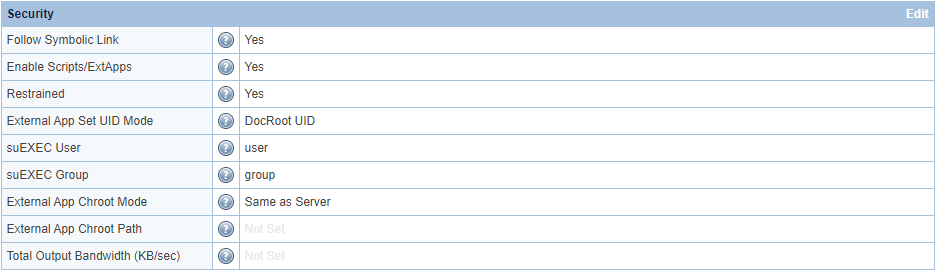 5. Navigate to Actions, and select the icons next to Restart Detached PHP Processes and Apply Changes / Graceful Restart.
 - Change External App Set UID Mode to
Control panel
PHP suEXEC for control panels
If you run shared-hosting services with a control panel, suEXEC mode is necessary for security reasons. LSWS installation scripts enable PHP suEXEC by default for all control panels, so LSWS runs PHP suEXEC out of the box. In suEXEC mode, each PHP process runs as the owner of the virtual host's document root. Once suEXEC is enabled, you generally should not make further changes to avoid permission problems, since PHP suEXEC generally runs as user:user, while non-PHP suEXEC runs as nobody:nobody.
To enable suEXEC for control panels when it is not already enabled, perform the following steps:
- Go to the WebAdmin Console at
https://192.0.2.123:7080and log in. - Navigate to Configuration > Server > General.
- Click Edit under Using Apache Configuration File.
-
Change PHP suEXEC to
Yes, and change PHP suEXEC Max Conn to10.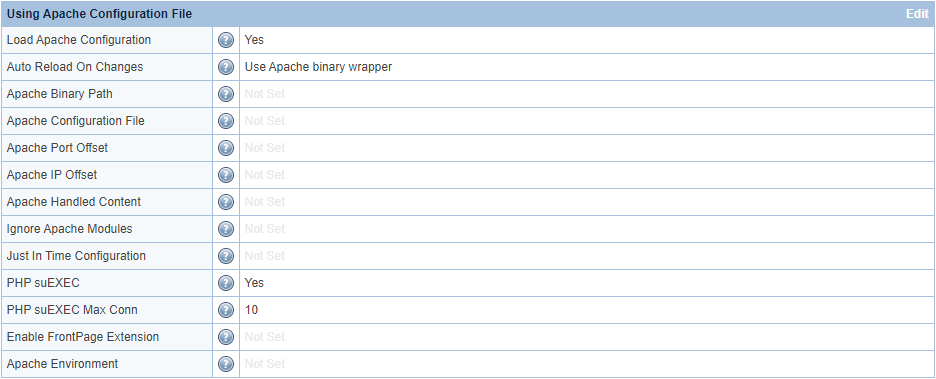 5. Navigate to Actions, and select the icons next to Restart Detached PHP Processes and Apply Changes / Graceful Restart.
Note
PHP suEXEC Max Conn is per worker. If you have two workers and set PHP suEXEC Max Conn to 10, you will have 20 (2 × 10) LSPHP processes with a default 33% peak burst allowance.
Customize PHP suEXEC handlers
The following list contains the default acceptable suEXEC handlers:
php,php5,php4,php52,php53,php54,php55,php56,php7,php70,php71,php72,php73,php74,php8,php80,php81,php82,php83,php84,php85,phtml,fastphp
This list should cover most situations. Any other handlers run as nobody:nobody and not in PHP suEXEC mode. Although you generally should not need to customize phpSuexecHandlers, you can do so.
Create a handler mapping, and append the new handler name to the end of the list.
Example
To add a php74ext suEXEC handler, create a mapping with the php74ext suffix:
<phpHandler>
  <id>php74ext</id>
  <command>/usr/local/lsws/lsphp74/bin/lsphp</command>
  <suffixes>php74ext</suffixes>
</phpHandler>
Then append php74ext to the default list:
php,php5,php4,php52,php53,php54,php55,php56,php7,php70,php71,php72,php73,php74,php8,php80,php81,php82,php83,php84,php85,phtml,fastphp,php74ext
Process modes
LiteSpeed Web Server offers several PHP process modes to meet the needs and goals of shared-hosting providers: ProcessGroup mode, Daemon mode, and Worker mode. These process modes take effect regardless of whether PHP uses standard or Detached mode and whether the execution method is suEXEC or non-suEXEC.
Note
PHP uses ProcessGroup mode by default. To use a different process mode, override PHP, and then follow the procedure in this document for the mode you want to use.
ProcessGroup mode
ProcessGroup mode is the default process mode used for Apache virtual host PHP handlers. ProcessGroup mode provisions a parent process for each process-group user. When PHP uses a suEXEC execution method, this parent process runs as the owner of the user's document root and spawns new child processes when that user requires a PHP process. This allows ProcessGroup mode to spawn processes quickly while providing highly effective per-user opcode caches.
Benefits
ProcessGroup mode reduces overhead and generates processes faster by forking child processes instead of creating new processes for each request from the same user. Because each process group has its own parent process, ProcessGroup mode is compatible with custom php.ini files and CloudLinux's PHP Selector.
When PHP uses a suEXEC execution method, ProcessGroup mode conserves resources by killing parent processes that have been idle for too long. This is more efficient than Apache + PHP-FPM, where at least one process is always running in each user's pool.
Like Daemon mode, ProcessGroup mode uses opcode caching. It also provides per-user opcode caches when PHP uses a suEXEC execution method. Because Daemon mode forks all processes from a single parent process, every user on the server shares one large opcode cache. If there are many users, this opcode cache can fill quickly, pushing other users' scripts out of the cache. By providing per-user opcode caches, each user's scripts remain in that user's opcode cache regardless of what other users are doing.
You can enable ProcessGroup mode at either the server or virtual host level through an httpd.conf file directive. By placing this directive in a virtual host-level configuration file, you can decide which users receive a personal opcode cache.
Compared to PHP-FPM + suEXEC, where each user must have a process pool set up manually, ProcessGroup mode can more easily and quickly achieve the same level of security. Add the ProcessGroup directive to the server-level httpd.conf file while using a suEXEC execution method.
Limitations
ProcessGroup mode keeps one parent process running in addition to all of its child processes. This creates extra processes that do not exist in LiteSpeed's Worker or Daemon modes. You can control this to some degree with the Max Idle Time setting. This setting tells LiteSpeed Web Server to kill ProcessGroup parent processes that have been idle longer than the configured time.
Personal opcode caches must be reasonably large to be useful, which almost certainly means allocating more RAM for opcode caching than you would in Daemon mode. This limits ProcessGroup mode to hosts that are willing to use extra memory for performance improvements. Be careful not to allocate too much memory for per-user opcode caches, as you could run out of memory.
LSPHP runs in Detached mode by default, allowing PHP processes to survive LSWS restarts. The LSPHP parent follows the Max Idle Time setting, and opcode cache is not reset.
Setup
ProcessGroup mode is the default mode for LiteSpeed Web Server.
To manually change the process mode, perform the following steps:
- Go to the WebAdmin Console at
https://192.0.2.123:7080and log in. - Navigate to Configuration > Server > External Application.
- Click Edit for the PHP version you want to edit.
- Change Start By Server to
Yes,Yes (Through CGI Daemon), orYes (Through CGI Daemon Async). - Change Instances to
1. - Change LSAPI_CHILDREN to a number greater than
1. - Navigate to Actions, and select the icons next to Restart Detached PHP Processes and Apply Changes / Graceful Restart.
In a control panel environment, you can enable ProcessGroup mode by placing the LSPHP_ProcessGroup on directive in an httpd.conf file. If you add it to a server-level configuration file, all virtual hosts use ProcessGroup mode. If you add it to a virtual host-level configuration file, only that virtual host uses ProcessGroup mode.
Example
Example configuration for a control panel environment:
<IfModule LiteSpeed>
LSPHP_ProcessGroup on
LSPHP_Workers 15
</IfModule>
This example applies only to directives. Environment variable syntax is different, as explained in the LSPHP Options documentation.
Warning
Apache does not understand the LiteSpeed-specific LSPHP_ProcessGroup and LSPHP_Workers directives. Apache may crash if it encounters these directives outside an <IfModule LiteSpeed> block.
Setting Start By Server to Yes (Through CGI Daemon) or Yes (Through CGI Daemon Async) may save resources by not starting parent processes for idle process groups at startup.
In the WebAdmin Console, navigate to Configuration > External App > your_external_application. The Max Idle Time setting controls how long a parent process can remain idle before being killed. In ProcessGroup mode, LiteSpeed Web Server treats a Max Idle Time setting of -1 as the default value of 30 seconds.
In the WebAdmin Console, navigate to Configuration > External App > your_external_application, and set Run On Start Up to No to start a parent process for each process group only when a user receives traffic. Setting Run On Start Up to Yes may result in errors.
If you use Daemon mode for some users while using ProcessGroup mode for others, navigate to Configuration > External App > your_external_application, and change Run On Start Up to Yes (Daemon mode). ProcessGroup mode can then override Daemon mode when it is selectively enabled on virtual hosts that require more powerful opcode caching.
When Run On Start Up is set to Yes or Yes (Daemon mode), the default value of Max Idle Time is 10 seconds. You can set this value to a large number, such as 3600, to prevent PHP from being stopped by the server too quickly.
You can control the maximum number of child processes that a parent process can spawn with the LSPHP_Workers directive. If set, this directive overrides the PHP suEXEC Max Conn setting. Navigate to Configuration > Server > General > Using Apache Configuration File to configure this setting.
PHP suEXEC Max Conn is per worker. If you have two workers and set PHP suEXEC Max Conn to 10, you will have 20 (2 × 10) LSPHP processes.
You can set opcode cache size per user in each user's php.ini file. The steps to set the size vary by opcode cache type.
Daemon mode
Daemon mode forks all processes from a single, continuously running daemon process. This mode makes effective use of opcode caching and dynamically spawned processes to reduce resource usage.
Benefits
Daemon mode reduces overhead and generates processes faster by forking child processes instead of creating a new process for each request from the same user.
When PHP uses a suEXEC execution method, Daemon mode conserves resources by killing parent processes that have been idle for too long. This is more efficient than Apache + PHP-FPM, where at least one process is always running in each user's pool.
Many suEXEC implementations start PHP processes as standalone processes, each with its own opcode cache. This provides only a small window in which to use the process's opcode cache before the process ends. In Daemon mode, all PHP processes share the same opcode cache memory, allowing for a larger opcode cache memory block and an improved cache hit rate because the cache is flushed less frequently.
Limitations
Daemon mode does not allow custom per-user php.ini files. As a result, LiteSpeed Web Server automatically switches to Worker mode at the server level if it detects a custom php.ini file.
Because it is incompatible with custom php.ini files, Daemon mode is not compatible with CloudLinux's PHP Selector.
Setup
To set up Daemon mode, perform the following steps:
- Go to the WebAdmin Console at
https://192.0.2.123:7080and log in. - Navigate to Configuration > Server > External Application.
- Click Edit for the PHP version you want to edit.
- Change Start By Server to
Yes. - Change Run On Start Up to
Yes (Daemon mode). - Navigate to Actions, and select the icons next to Restart Detached PHP Processes and Apply Changes / Graceful Restart.
Worker mode
Worker mode uses standard PHP with LSAPI and dynamically creates new PHP processes as needed.
Benefits
Worker mode is compatible with custom php.ini files, including CloudLinux's CageFS php.ini files, and allows the use of CloudLinux's PHP Selector.
Worker mode conserves resources by killing idle processes. When PHP uses a suEXEC execution method, Worker mode is more efficient than Apache + PHP-FPM, where at least one process is always running in each user's pool.
Limitations
Worker mode creates a new PHP process when needed, which causes the process's opcode cache to be flushed when the process exits. This makes Worker mode incompatible with opcode and APCu caching. For this reason, use Worker mode only if you need custom php.ini files and server resources are too limited for ProcessGroup mode.
Creating a new process has more overhead than forking child processes. This may cause Worker mode to be slightly slower than Daemon or ProcessGroup mode. You can significantly reduce this overhead by changing the Start By Server value.
To change Start By Server, perform the following steps:
- Go to the WebAdmin Console at
https://192.0.2.123:7080and log in. - Navigate to Configuration > Server > External Application.
- Click Edit for the PHP version you want to change.
- Change Start By Server to
Yes (Through CGI Daemon)orYes (Through CGI Daemon Async). - Navigate to Actions, and select the icons next to Restart Detached PHP Processes and Apply Changes / Graceful Restart.
Setup
LiteSpeed Web Server uses Worker mode when the requirements for ProcessGroup mode, the default mode, or Daemon mode are not met. LiteSpeed Web Server may also automatically switch to Worker mode at the server level if it detects a custom php.ini file while running in Daemon mode.
Mode comparison
| ProcessGroup | Daemon | Worker | |
|---|---|---|---|
| Forks processes instead of spawning new processes | Yes | Yes | No |
| Number of parent processes | One for each process group or user | 1 | 0 |
| Can customize number of processes per account? | Yes | Yes | Yes |
| Can enable only for certain virtual hosts? | Yes | No | No |
Custom php.ini supported, including CageFS custom php.ini? | Yes | No | Yes |
| Opcode caching | Dedicated per user | Shared throughout server | No |
Detached mode
PHP Detached mode is available in all modern versions of LSWS and OpenLiteSpeed.
In LSWS v5.2.x and earlier, all PHP processes were attached to LiteSpeed Web Server processes. As such, when LiteSpeed Web Server restarted, the PHP processes also restarted. In PHP Detached mode, PHP processes continue running independently, even when LiteSpeed Web Server restarts.
When you run PHP in ProcessGroup mode, LiteSpeed processes still start PHP process groups. When the first request for a specific PHP process group is received, LiteSpeed starts PHP if it is not already running for that process group. pstree shows the PHP process as a child of the LiteSpeed process. This is normal. Once the LiteSpeed process exits, the PHP process does not quit and becomes independent.
Note
PHP Detached mode does not mean that PHP runs forever. It still follows the Max Idle Time setting. To make PHP run longer, increase Max Idle Time to a large number, such as 3600. Never set it to -1 to indicate “unlimited,” because ProcessGroup mode automatically converts values below 30 to the default value of 30 seconds.
Changes to Detached mode take effect when the application restarts. The Detached mode application does not start when the server starts. Instead, it starts on demand when traffic reaches the external application, and it remains running even if LSWS restarts.
The same behavior applies to restarts. An external application is checked and restarted only when it is about to serve a request.
Benefits
PHP Detached mode is especially beneficial when hundreds of accounts are hosted on the same shared-hosting server and new accounts are added rapidly. In these cases, there is no need to restart all PHP processes during a web server restart. When a user relies heavily on an opcode cache to reduce server load, PHP Detached mode also avoids resetting the opcode cache during a server restart.
Setup
If you are using a control panel, LSWS enables PHP Detached mode automatically.
If you are using LSWS in Native mode and explicitly configure an external application for each virtual host, set Run On Start Up to Yes (Detached Mode).
Native
To enable Detached mode for an external application, perform the following steps:
- Go to the WebAdmin Console at
https://192.0.2.123:7080and log in. - Navigate to Configuration > Server > External Application.
- Click Edit for the PHP version for which you want to enable Detached mode.
- Change Run On Start Up to
Yes (Detached Mode). - Navigate to Actions, and select the icons next to Restart Detached PHP Processes and Apply Changes / Graceful Restart.
Restart
Previously, when you made changes to php.ini, you probably restarted LSWS to apply them because LSWS restarted PHP processes.
PHP runs in Detached mode and is not restarted when LSWS restarts. To make php.ini changes take effect immediately, restart PHP processes using one of the following methods.
Specific user
To restart detached PHP processes at the account or virtual host level, use touch to create or update a .lsphp_restart.txt file in the user's home directory:
touch <user_home>/.lsphp_restart.txt
Once .lsphp_restart.txt is created, the user's PHP restarts when the next request arrives. The .lsphp_restart.txt file is not removed. LSWS checks the file timestamp to determine whether the user's detached PHP needs to be restarted. You can remove the file manually, but this is not necessary. Each time you want to restart that user's detached PHP, touch the file again to refresh the timestamp, regardless of whether the file already exists.
To maintain CloudLinux mod_lsapi CRIU feature compatibility, the server also restarts PHP if it finds a mod_lsapi_reset_me file:
touch <user_home>/mod_lsapi_reset_me
Users can also restart detached PHP processes from the Advanced page of the LiteSpeed Web Cache Manager cPanel plugin, which is accessible from the cPanel dashboard.
Server
To restart detached PHP processes at the server level, use touch to create or update a .lsphp_restart.txt file in the <lsws_server_root>/admin/tmp/ directory. The default location is /usr/local/lsws/admin/tmp/.
sudo touch /usr/local/lsws/admin/tmp/.lsphp_restart.txt
You can also restart these processes from the Actions page of the WebAdmin Console or by using the Restart Detached PHP Processes button in LiteSpeed control panel plugins.
All running detached PHP processes restart when the server next needs to use that PHP handler.
Force
To stop all LSPHP processes immediately, manually kill them from the command line:
sudo killall lsphp