Improve PHP Performance
General tips
-
Consider using one of our LiteSpeed Cache plugins. These can improve site performance.
-
Install and enable a PHP opcode cache.
-
Check the real-time stats for the number of PHP processes during peak time in WebAdmin Console > Actions > Real-Time Stats > External Application. Check In Use, Idle, and WaitQ. If WaitQ is frequently higher than
0, the PHP max concurrency setting may need to be increased. For shared hosting environments, where PHP suEXEC is normally used, PHP suEXEC Max Conn needs to be increased. See our PHP Concurrency documentation for more information on determining if PHP suEXEC is used and how to increase the max concurrency of PHP. -
If you see an error like the following in
stderr.log, try increasingLSAPI_CHILDREN:[STDERR] Reached max children process limit: 10, extra: 3, current: 13, please increase LSAPI_CHILDRENIn a control panel environment, you would change the PHP suEXEC Max Conn setting, found under Configuration > Server > General > Using Apache Configuration File, not the
LSAPI_CHILDRENsetting in External Apps. -
Check your
topoutput to determine which processes are using too much CPU or memory. Buggy PHP code could be causing these performance issues. -
If the server has enough free memory, put PHP sessions and opcode cache disk storage under
/dev/shm. -
Have you enabled the
timezonedbmodule for your PHP? It is common to see poorer performance after moving to a cloud server with shared storage, as the I/O latency sometimes causes trouble. A server with local disk may not notice the absence of the PHPtimezonedbmodule with built-in DB, but it can be very costly for a cloud server with shared storage since PHP will scan hundreds of directories. -
cPanel/WHM users should disable the PHP
open_basedirfeature. -
Try PHP 8.x/7.x instead of PHP 5.x. PHP 8.x/7.x claims to be twice as fast as PHP 5.x.
-
Make sure PHP
xdebugandsnmpmodules are disabled if you do not need them. Thexdebugmodule is for developer IDE integration only and should not be installed by default. Thesnmpmodule will scan and parse available MIB files, but not everyone needssnmpsupport.
Increase Max Idle Time
If ProcessGroup mode is enabled, it is like a dynamic, on-demand PHP-FPM pool. It is PHP-opcode-cache-friendly when the ProcessGroup is not stopped due to being idle.
You can increase Max Idle Time to keep the ProcessGroup alive longer.
Remember, idle PHP processes will occupy system resources. You will need to find a balance between speed and capacity/scalability.
How to increase Max Idle Time
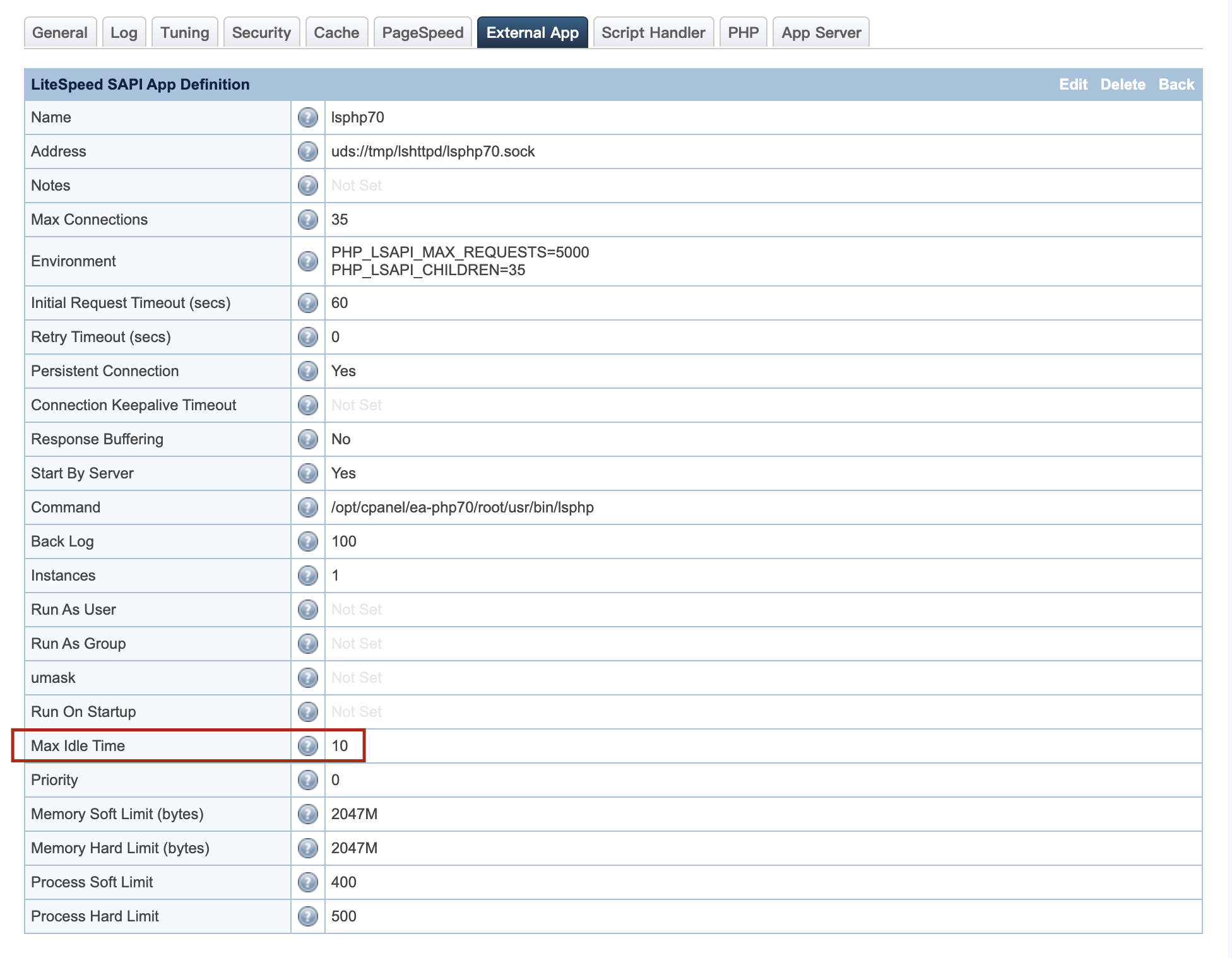
You can set Max Idle Time in the External App tab or the PHP tab, if you do not have an External App tab, at the server level in your WebAdmin Console. This will apply globally to all virtual hosts.
If you are running a shared hosting server, and you would prefer to set Max Idle Time for an individual virtual host, add the following directive to the virtual host's Apache configuration file:
<IfModule LiteSpeed>
LS_EXTAPP_ENV LSAPI_PGRP_MAX_IDLE=3600
</IfModule>
Identify slow scripts
When working with PHP, you may notice that your site is taking longer to load than expected. It would be useful to learn the reason why. You can run strace, but sometimes that information is not the easiest to read.
If you are a PHP programmer, you have likely used PHP’s error_log function at some point. But PHP itself does not provide a way to identify slow scripts.
Slow scripts do not necessarily break your site, but they can be slow by themselves, and they can slow down your server overall as they increase CPU overhead. With PHP-FPM, there is a slow_log function, by which developers can get a trace of functions whose runtime exceeds a specified threshold.
LiteSpeed uses the faster LiteSpeed API (LSPHP) instead of PHP-FPM. So, what is the best way to identify slow scripts with LSWS and LSPHP?
There is a directive that can be placed in the external application settings. Navigate to WebAdmin Console > Configuration > External App and add the following to Environment:
LSAPI_SLOW_REQ_MSECS=10000
If LSAPI_SLOW_REQ_MSECS is set to a non-zero number, LiteSpeed Web Server will log requests into an error log file if a request takes longer than the specified number of milliseconds. This can help identify scripts that are slowing down your server.

The output of the slow script trace is written to stderr.log in the LiteSpeed log directory. An example message would look like this:
[12/Dec/2017:15:37:41] Slow PHP script: 10993 ms
  URL: GET /wordpress/index.php
  Query String:
  Script: /home/user/olsws/Example/html/wordpress/index.php
There may be many of these messages. Note that script slowdowns tend to appear in groups around the time of highest CPU load. When looking to identify what is slowing down a script, a good place to start is with the script's author.
Opcode caching
LiteSpeed Web Server allows for effective use of PHP opcode caching with shared hosting.
What is opcode caching?
Opcode caching speeds up PHP by caching the compiled opcode of PHP scripts. The server can then use this opcode to respond to requests for a PHP script instead of parsing and compiling the source code for each request. This opcode is stored in shared memory for faster processing. All opcode caches will allow you to set the limit for how much RAM may be allocated to opcode caching.
Opcode caching limitations
-
Opcode caching requires extra RAM. The RAM limit you set for opcode caching will be automatically partitioned off. You will lose access to this RAM for other uses, so do not allow opcode caching to use too much of your RAM. For example, for a Plesk user, normally
128Mmemory is allowed for that account, so opcode cache should be set to32Mor lower. We have seen out-of-memory errors when opcode cache memory is set to64M. -
Opcode caching requires PHP processes to be forked from the same parent process in order to share the cache. If the parent process is killed, the cache is flushed. This is why opcode caching does not work well with Apache's suPHP. suPHP starts a new process for each PHP process, causing opcode cache to be flushed almost as soon as it is created. LiteSpeed's Daemon mode and ProcessGroup mode have been developed for greater use of opcode caching with PHP suEXEC, while default Worker mode does not. Please change to the appropriate mode when enabling opcode cache.
-
Opcode caches can be buggy. Many users find that choosing an opcode cache is a matter of trial and error; different opcode caches work better in different setups.
-
Opcode caches can cause 503 errors. This is an extension of the previous point. Opcode caches are a frequent cause of 503 errors. Try turning off your opcode cache if you are getting 503 errors.